Live Mode
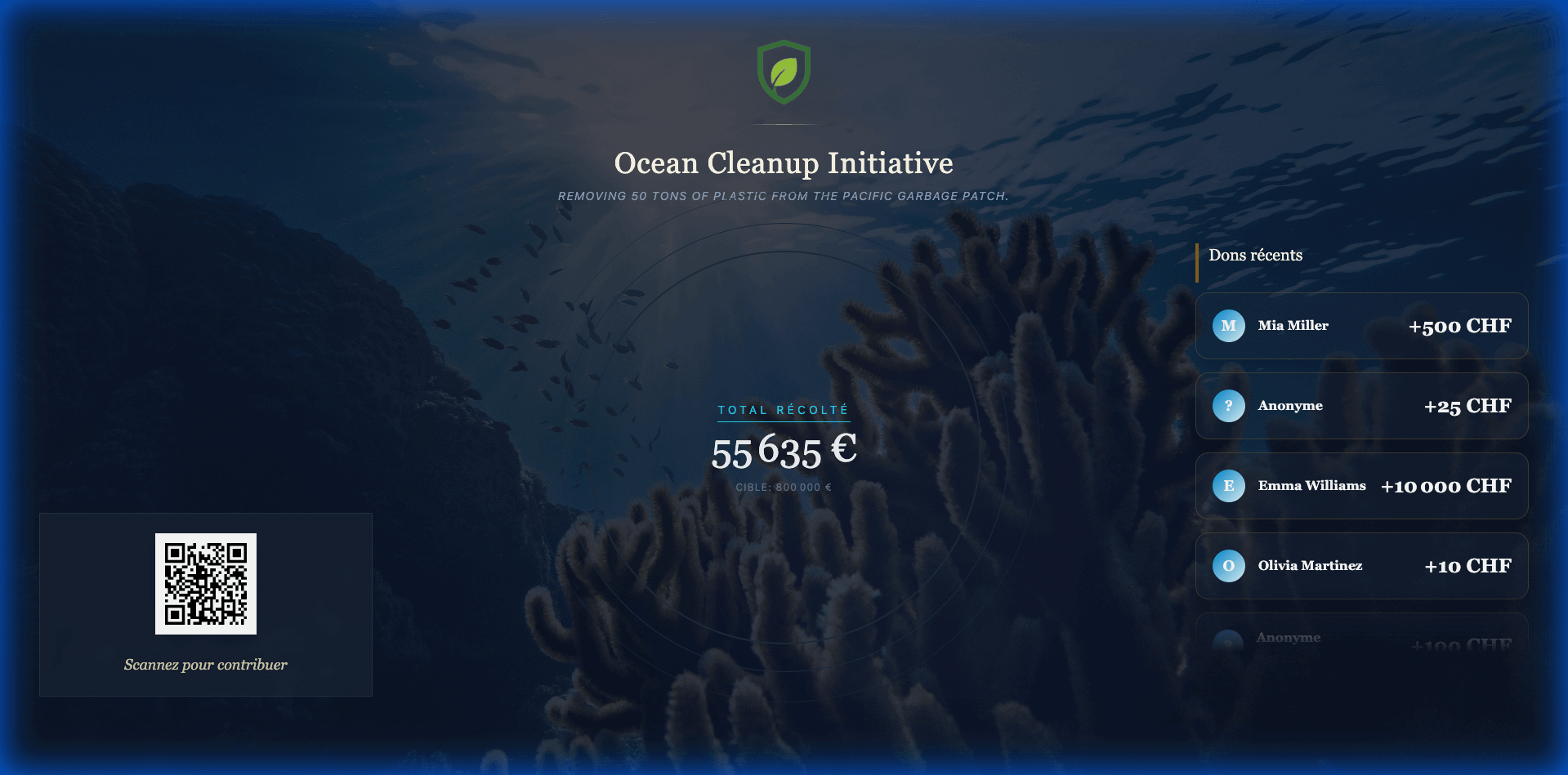
The Live Mode is a dedicated display designed to be projected on large screens during your event. It builds momentum by visualizing fundraising progress in real-time.
Launching Live Mode
- Go to your Event Dashboard.
- Click the "Live Screen" button or navigate to
/[event-slug]/live. - Full Screen: Press
F11(or your browser's full-screen key) for the best experience.
Features
1. Progress Gauge
A large, animated gauge shows the current total raised against the event goal. It updates instantly whenever a new donation is processed (online or via staff).
2. QR Code
A dynamic QR code is displayed on-screen. Attendees can scan this code with their smartphones to be taken directly to the Donation Page with the event pre-selected.
3. Recent Donations
A scrolling ticker or list displays the names and amounts of the most recent donors.
- Anonymous donations will appear as "Anonymous".
4. Notifications
When a large donation occurs, a celebration animation (confetti or notification card) will momentarily take over the screen to recognize the donor.
Customization
The look of the Live Mode is determined by the Live Page Theme selected in Event Settings > Design & Branding.